Showing posts with label WFP. Show all posts

Sunday, 10 April 2022

Windows Filtering Platform and Window Service Hardening Rules

The Windows Filtering Platform (WFP) is an important Windows system component that I had only ever endeavoured to understand in sufficient depth to meet current needs.

The Microsoft documentation says: “Windows Filtering Platform (WFP) performs its tasks by integrating the following basic entities: Layers, Filters, Shims, and Callouts.”

Use (and management) of rules in Windows Defender Firewall required an understanding of WFP filters; interpreting the data captured by Microsoft Message Analyser benefitted from understanding WFP layers and callouts; experimenting with IPsec, VPN and DirectAccess benefitted from understanding WFP layers, callouts and provider contexts.

One aspect of WFP that I dismissed/ignored as just a grouping mechanism was WFP sublayers; their role in classification and filter arbitration is described in the Microsoft documentation, but I never previously read this closely enough.

I wrote about Network Discovery last year and was surprised and embarrassed when I noticed that the list of discovered computers under Windows 11 was incomplete for reasons that I could not explain – the local computer (which had previously always been in the list) was not present. Initially, I just quickly dismissed this as a “by design” decision until I noticed a correlation between the process of network discovery and WFP packet drop events. Here is the output of the “netsh wfp show netevents” command for the drop event:

<header>
       <timeStamp>2022-04-09T09:14:32.144Z</timeStamp>
       <flags numItems="9">
              <item>FWPM_NET_EVENT_FLAG_IP_PROTOCOL_SET</item>
              <item>FWPM_NET_EVENT_FLAG_LOCAL_ADDR_SET</item>
              <item>FWPM_NET_EVENT_FLAG_REMOTE_ADDR_SET</item>
              <item>FWPM_NET_EVENT_FLAG_LOCAL_PORT_SET</item>
              <item>FWPM_NET_EVENT_FLAG_REMOTE_PORT_SET</item>
              <item>FWPM_NET_EVENT_FLAG_APP_ID_SET</item>
              <item>FWPM_NET_EVENT_FLAG_USER_ID_SET</item>
              <item>FWPM_NET_EVENT_FLAG_IP_VERSION_SET</item>
              <item>FWPM_NET_EVENT_FLAG_PACKAGE_ID_SET</item>
       </flags>
       <ipVersion>FWP_IP_VERSION_V6</ipVersion>
       <ipProtocol>17</ipProtocol>
       <localAddrV6.byteArray16>::1</localAddrV6.byteArray16>
       <remoteAddrV6.byteArray16>::1</remoteAddrV6.byteArray16>
       <localPort>50602</localPort>
       <remotePort>3702</remotePort>
       <scopeId>0</scopeId>
       <appId>
       <data>5c006400650076006900630065005c0068006100720064006400690073006b0076006f006c0075006d00650033005c00770069006e0064006f00770073005c00730079007300740065006d00330032005c0073007600630068006f00730074002e006500780065000000</data>
       <asString>\.d.e.v.i.c.e.\.h.a.r.d.d.i.s.k.v.o.l.u.m.e.3.\.w.i.n.d.o.w.s.\.s.y.s.t.e.m.3.2.\.s.v.c.h.o.s.t...e.x.e...</asString>
       </appId>
       <userId>S-1-5-19</userId>
       <addressFamily>FWP_AF_INET6</addressFamily>
       <packageSid>S-1-0-0</packageSid>
       <enterpriseId/>
       <policyFlags>0</policyFlags>
       <effectiveName/>
</header>
<type>FWPM_NET_EVENT_TYPE_PUBLIC_CLASSIFY_DROP</type>
<classifyDrop>
       <filterId>69067</filterId>
       <layerId>46</layerId>
       <reauthReason>0</reauthReason>
       <originalProfile>0</originalProfile>
       <currentProfile>0</currentProfile>
       <msFwpDirection>MS_FWP_DIRECTION_OUT</msFwpDirection>
       <isLoopback>true</isLoopback>
       <vSwitchId/>
       <vSwitchSourcePort>0</vSwitchSourcePort>
       <vSwitchDestinationPort>0</vSwitchDestinationPort>
</classifyDrop>
<internalFields>
       <internalFlags numItems="1">
              <item>FWPM_NET_EVENT_INTERNAL_FLAG_FILTER_ORIGIN_SET</item>
       </internalFlags>
       <capabilities/>
       <fqbnVersion>0</fqbnVersion>
       <fqbnName/>
       <terminatingFiltersInfo numItems="4">
              <item>
                     <filterId>67000</filterId>
                     <subLayer>FWPP_SUBLAYER_INTERNAL_FIREWALL_APP_ISOLATION</subLayer>
                     <actionType>FWP_ACTION_PERMIT</actionType>
              </item>
              <item>
                     <filterId>66827</filterId>
                     <subLayer>FWPP_SUBLAYER_INTERNAL_FIREWALL_QUARANTINE</subLayer>
                     <actionType>FWP_ACTION_PERMIT</actionType>
              </item>
              <item>
                     <filterId>69067</filterId>
                     <subLayer>FWPP_SUBLAYER_INTERNAL_FIREWALL_WSH</subLayer>
                     <actionType>FWP_ACTION_BLOCK</actionType>
              </item>
              <item>
                     <filterId>66219</filterId>
                     <subLayer>FWPP_SUBLAYER_INTERNAL_FIREWALL_WF</subLayer>
                     <actionType>FWP_ACTION_PERMIT</actionType>
              </item>
       </terminatingFiltersInfo>
       <filterOrigin>WSH Default</filterOrigin>
       <interfaceLuid>6755399457832960</interfaceLuid>
</internalFields>

The section highlighted in yellow was new to me and particularly intriguing was the “terminatingFiltersInfo” data. It only became clear later that what this showed was all of the sublayers in layer 46 (FWPS_LAYER_ALE_AUTH_RECV_ACCEPT_V6) that contained one or more filters that matched the packet. Within each sublayer the filters are evaluated and the filter that delivers the “terminating” action (based on filter weight, action, rights, etc. as discussed in the Filter Arbitration documentation) for that sublayer is reported.

Comparing the filters of Windows 10 and 11 systems gave part of the answer why the local computer was missing from the list of computers. The equivalent for the terminating filter for the FWPP_SUBLAYER_INTERNAL_FIREWALL_APP_ISOLATION sublayer in Windows 11 (named “AppContainerLoopback”) is defined in the FWPM_SUBLAYER_MPSSVC_WSH sublayer under Windows 10. The (blocking) terminating filter in the FWPP_SUBLAYER_INTERNAL_FIREWALL_WSH sublayer is named “WSH Default Inbound Block”.

This means that in Windows 10, the “AppContainerLoopback” filter can (and does, via weighting) override the “WSH Default Inbound Block” filter because they are in the same sublayer; this is not true for Windows 11.

This change of sublayer for the “AppContainerLoopback” loopback filter explains the difference in behaviour between Windows 10 and 11 but still leaves a mystery: there are 7 WSH rules/filters for the “Function Discovery Provider Host” (fdphost) service and one, named “Allow inbound UDP traffic to fdphost port 3702”, is possibly intended to allow responses to the WS-Discovery multicast probes to be received.

Some more detailed tracing is needed to form a hypothesis for this behaviour. The trace command that I used was:

pktmon start --trace --provider Microsoft-Windows-WFP --provider Microsoft-Windows-TCPIP --keywords 0x300408080 --level 17 --provider "TCPIP Service Trace" --keywords 0x17100 --level 6 --file-name why.etl

Provider Microsoft-Windows-WFP is an obvious choice and the Microsoft-Windows-TCPIP provider with the keywords ut:TcpipDiagnosis, ut:AleRemoteEndpoint, ut:Loopback, ut:SendPath, ut:ReceivePath limits the (verbose) output of that provider to the more relevant events. These two providers give background information about what is happening at any particular time and the "TCPIP Service Trace" with keywords WFP_TRACE_BASE, WFP_TRACE_FE, WFP_TRACE_STM, WFP_TRACE_ALE, NETIO_TRACE_TUNNEL provides the details.

"TCPIP Service Trace" is a WPP (Windows Software Trace Preprocessor) provider, so its data is difficult to interpret without the corresponding private .pdb file. Here is an indication of the type of information in the trace data:

This shows the packet being sent, no existing flow found and each of the filters in the layer being tested against the packet:


The data made available to the filters is also logged, as is the final result:


Once the packet has passed the outbound filters, one can see that the packet is looped back and inbound filtering is started:


Finally, one can see that the packet is dropped:


The filter responsible for the drop (“WSH Default Inbound Block”) only has one filter condition and that is a match against FWPM_CONDITION_ALE_USER_ID. The information used for this condition is a self-relative TOKEN_ACCESS_INFORMATION structure and this is included in the trace (as a binary blob).

Formatting that blob shows something like this:

SidHash Offset 0x58
SidHash 0x00000000 S-1-5-19
SidHash 0x00000060 S-1-16-16384
SidHash 0x00000007 S-1-1-0
SidHash 0x00000007 S-1-5-32-545
SidHash 0x00000007 S-1-5-6
SidHash 0x00000007 S-1-2-1
SidHash 0x00000007 S-1-5-11
SidHash 0x00000007 S-1-5-15
SidHash 0x0000000E S-1-5-80-364023826-931424190-487969545-1024119571-74567675
SidHash 0xC000000F S-1-5-5-0-11718649
SidHash 0x00000007 S-1-2-0
SidHash 0x00000007 S-1-5-32-3167453650-624722384-889205278-321484983-714554697-3592933102-807660695-1632717421
SidHash 0x00000007 S-1-5-32-383293015-3350740429-1839969850-1819881064-1569454686-4198502490-78857879-1413643331
SidHash 0x00000007 S-1-5-32-2035927579-283314533-3422103930-3587774809-765962649-3034203285-3544878962-607181067
SidHash 0x00000007 S-1-5-32-3659434007-2290108278-1125199667-3679670526-1293081662-2164323352-1777701501-2595986263
SidHash 0x00000007 S-1-5-32-11742800-2107441976-3443185924-4134956905-3840447964-3749968454-3843513199-670971053
SidHash 0x00000007 S-1-5-32-3523901360-1745872541-794127107-675934034-1867954868-1951917511-1111796624-2052600462
SidHash 0x00000007 S-1-5-32-1488445330-856673777-1515413738-1380768593-2977925950-2228326386-886087428-2802422674
RestrictedSidHash Offset 0x4A0
Privileges Offset 0x800
Privilege 0x00000003 0x0000000000000017
Privilege 0x00000003 0x000000000000001D
AuthenticationId 0x3E5
TokenType TokenPrimary
ImpersonationLevel SecurityAnonymous
MandatoryPolicy NO_WRITE_UP, NEW_PROCESS_MIN
Flags 0x1002800
AppContainerNumber 0
CapabilitiesHash Offset 0x5B0
SecurityAttributes Offset 0x6C0
SecurityAttributes Name="TSA://ProcUnique" Type=2 Flags=0x0 Count=2 X1=0x41
  Value[0]=245
  Value[1]=11718747
 

The S-1-5-80 (service SID) is the service SID of the receiving process (“fdphost” (Function Discovery Provider Host)).

fdphost sends a WS-Discovery probe to a multicast address and UDP port 3702, but it sends the probe from its randomly assigned local port number; replies to the probes are sent back to this port number. Non-loopback replies are permitted by an ALE multicast flow but, for currently unknown reasons, loopback replies are subjected to a full “classification” – which results in a drop decision. My hypothesis is that no attempt is made to match loopback packets against existing ALE multicast flows.

I searched the web for mentions of the local system not appearing in the list of discovered computers and found none. I also asked on the Microsoft Q&A website and received one report that the issue did not appear to be present – so the hypothesis is unconfirmed (or even “in doubt”) at the moment…

Tuesday, 10 December 2019

Implementing an IKEv2 VPN client under Windows 10 VPN


I have previously written about the difficulties of implementing a Cisco AnyConnect VPN client using just the Extensible Authentication Protocol (EAP) framework and interfaces in Windows 10: most of what needs to be done to enable the establishment of VPN connections to an AnyConnect server can be implemented as an EAP authentication mechanism, but some requirements cannot be fulfilled within this framework. These requirements are: use of IKEv2 Vendor ID payloads, control of the IDi Identification payload and access to IKEv2 messages and derived keys for the AnyConnect authentication computations.


The first two messages in the establishment of an IKEv2 security association are sent in plain text, so one can see their content with a simple network sniffer, but subsequent messages are encrypted and if the “protocol” is not fully documented (e.g. the AnyConnect EAP mechanism) then one needs to somehow see these encrypted messages in plain text. There are several ways to do this, but if one has access to an original client and server then one way is particularly useful – develop server and client replacements in “steps”. By “steps” I mean implement the known steps of the protocol and then use the original client/server in conjunction with the new server/client to capture the next unknown packet in plain text.


For example, at the start of the process one does not know what the client will send in its second message (its first encrypted message), so one can use the original client to connect to the new server (that, at first, only knows how to handle the first, unencrypted, message exchange). After seeing what the original client sends, one can use the new client to send an equivalent message to an original server and see what it returns in plain text. With the exception of the detailed cryptographic computations used in the authentication process, one can derive an understanding of the full protocol exchanges using this technique.


At the end of the process, one has a full keying module for the protocol but, having served its purpose as a way of understanding the protocol, it is of little practical use without two other components: an implementation of the Encapsulating Security Payload (ESP) protocol and a mechanism for creating the operating system “objects” (such as network interfaces) that can be assigned IP addresses, appear in routing tables, etc..


It is perhaps not widely known, but the Windows Filtering Platform (WFP) Base Filtering Engine (BFE) contains all of the functionality necessary for the first the first task (using ESP to transport data) and is documented and fully supported. Two documentation entries in Using Windows Filtering Platform are particularly useful: Using Tunnel Mode and Manual SA Keying.

At this stage, it suffices to say that the first task can be implemented using documented APIs and the C# programming language (with quite a large investment of time in creating C# declarations of the WFP data structures). But before expanding on this topic, it would be reassuring to know that the second task (creating a “network interface”) can also be achieved. There appears to be no documented API for this, but the Microsoft IKEv2 implementation (part of IKEEXT) uses the DLL “vpnikeapi”. The DLL exports of vpnikeapi look very promising:


CancelProcessEapAuthPacket

CloseTunnel

CreateTunnel

FreeConfigurationPayloadBuffer

FreeEapAuthAttributes

FreeEapAuthPacket

FreeIDPayloadBuffer

FreeTrafficSelectors

GetConfigurationPayloadRequest

GetIDPayload

GetOptionalIDrPayload

GetServerEapAuthRequestPacket

GetTrafficSelectorsRequest

NewRasIncomingCall

ProcessAdditionalAddressNotification

ProcessConfigurationPayloadReply

ProcessConfigurationPayloadRequest

ProcessEapAuthPacket

ProcessTrafficSelectorsReply

ProcessTrafficSelectorsRequest

QueryEapAuthAttributes

RemoveTrafficSelectors

TunnelAuthDone

UpdateTunnel

This looks just like the set of routines that would be needed to integrate IKEv2 into an operating system as both a client and a server. The IKEv2 payloads Configuration, Identification, Traffic Selector and EAP are just those that have relevance to the operating system, “ProcessAdditionalAddressNotification” sounds as though it supports MOBIKE and there are routines to create and close a “tunnel”.


Unfortunately, there is one preparatory step that must be performed before using these routines and the implications of that step make the vpnikeapi DLL unsuitable for my purposes. Why that is the case will become apparent later.

Flow of control and data in the Windows IKEv2 VPN implementation


The RasDial routine is the entry point for the flow of control for the establishment of a VPN connection and %APPDATA%\Microsoft\Network\Connections\Pbk\rasphone.pbk is the source of the configuration data for the connection. RasDial communicates with the “RasMan” (Remote Access Connection Manager) service via RPC and most of the operating system specific “action” takes place in that service; RasMan communicates with the IKEEXT (IKE and AuthIP IPsec Keying Modules) service for IKE/IKEv2/AuthIP protocol specific functionality.


When the IKEEXT service starts up, it uses the undocumented WFP routine IPsecKeyModuleAdd0 to register itself as the keying module provider for IKE, IKEv2 and AuthIP; the registration includes call-back routines to acquire and expire Security Associations. When RasMan needs the services of a registered keying module, it uses the undocumented routine IPsecSaInitiateAsync0 to initiate the behaviour (by invoking one of the registered call-back routines) and the keying module uses the routine IPsecKeyModuleUpdateAcquire0 to feedback progress. IPsecKeyModuleDelete0 rounds out the small set of keying module routines.


Some information is passed to the keying module in the parameters of the call-back routine, but this information is largely references to information stored dynamically in WFP in the form of “provider contexts”. These “provider contexts” are created from information specified in the mainModeTunnelPolicy, tunnelPolicy and keyModKey arguments to the FwpmIPsecTunnelAdd2 routine:


DWORD FwpmIPsecTunnelAdd2(

  HANDLE                       engineHandle,

  UINT32                       flags,

  const FWPM_PROVIDER_CONTEXT2 *mainModePolicy,

  const FWPM_PROVIDER_CONTEXT2 *tunnelPolicy,

  UINT32                       numFilterConditions,

  const FWPM_FILTER_CONDITION0 *filterConditions,

  const GUID                   *keyModKey,

  PSECURITY_DESCRIPTOR         sd

);


The routines exported by vpnikeapi (but implemented by vpnike.dll in the RasMan service) are only available for use when a VPN establishment has been initiated by RasDial or similar. rasphone.pbk does not directly define the keying module GUID to be used (instead, it indicates (via VpnStrategy) which type of VPN is preferred and RasMan chooses the appropriate keying module GUID), so while it would be easy to register a parallel/alternative IKEv2 keying module, it would be difficult to route any work to it. To make the situation even clearer, vpnike contains an explicit test that its client is IKEEXT (via the IKEEXT service SID), so even if one did register a new keying module and managed to persuade RasMan to use it and initialize the data structures needed for vpnikeapi use, the new keying module would fail the security tests performed by the vpnike DLL.

Short aside: VPN Connection IPsec Configuration


By default, the Windows IKEv2 VPN client makes 18 Main Mode Security Association (SA) Proposals and 6 Quick Mode SA proposals. This default list of proposals can be strengthened and shortened by registry entries (such as NegotiateDH2048_AES256) or set (and limited) to one proposal by use of the Set-VpnConnectionIPsecConfiguration PowerShell cmdlet.


The flexibility of SA Proposals and Transform in IKEv2 means that often two proposals (one proposal with GCM/CCM mode cipher algorithms and one with CBC mode cipher algorithms) are adequate. However the WFP data structures used to communicate this information between RasMan and IKEEXT were probably designed before IKEv2 was standardized and do not support its flexibility – they are better suited to the IKE proposal model.


The format of proposals stored in rasphone.pbk exhibits the same problem (one transform of each type per proposal). They are stored as a sequence of serialized ROUTER_CUSTOM_IKEv2_POLICY_0 structures with the name “CustomIPSecPolicies”; “NumCustomPolicy” records how many proposals there are. Set-VpnConnectionIPsecConfiguration always creates a single custom IPsec policy, but manual editing of rasphone.pbk can be used to add more.

How to create a Network Interface?


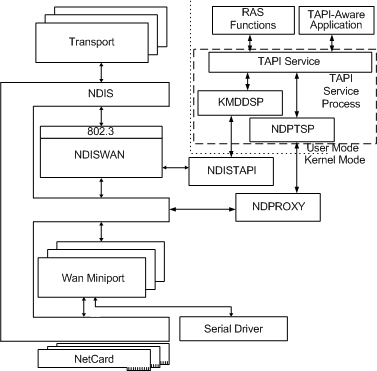
This picture taken from the RAS Architecture Overview shows the search area for a solution to the problem of creating a network interface to “front up” (present an interface to the operating system) of the ESP secured (VPN) connection that I hoped to establish:


The Windows 10 IKEv2 client is sometimes known as the “Agile VPN” client and there is an agilevpn.sys WAN Miniport Driver which will probably be needed by any solution built from existing components. The diagram shows two potential user-mode interfaces that might provide the required functionality: RAS and TAPI (the Telephony API). However, I could not find any set of documented RAS or TAPI routines that could make any effective contribution to solving the problem (the routines that RasMan uses are not exported from any DLL (they are internal to vpnike.dll, rasmans.dll, etc.)).


The next step was to assume that the interface between the user-mode abstractions and the kernel-mode functionality was implemented with Device I/O Controls (IOCTLs). Tracing control and data flows across this boundary during VPN connection establishment suggested that IOCTLs to four different device drivers would be necessary:


\Device\NDProxy

\Device\NdisWan

\Device\AgileVPN

\Device\WANARP


This turned out to be almost correct, but one thing further was needed to complete the task: a call to the undocumented routine “NsiSetAllParameters”.


The security descriptors on the NDProxy and AgileVPN devices permit only access by SYSTEM; NdisWan grants access to SYSTEM and NETWORK SERVICE and WANARP grants some access to “Authenticated Users”.

NDProxy


As suggested by the architecture overview diagram, and in practice, NDProxy is the first point of contact.


After opening the device, one can issue a “connect” IOCTL, which returns the number of devices (numbered from zero to N - 1) which can be used via NDProxy; this is typically 5: the WAN Miniports SSTP, IKEv2, L2TP, PPTP and PPPOE. One can then iterate over these miniports, looking for one with a NDIS_WAN_MEDIUM_SUBTYPE of NdisWanMediumAgileVPN (i.e. IKEv2).


Having identified and opened the miniport, the next step is to make a “call” on it via a “query info” IOCTL with OID_TAPI_MAKE_CALL. The type of information needed to make the call includes the IP address of the VPN server, the network interface index via which the VPN server is reachable (the GetBestInterfaceEx API routine for the VPN server address returns the needed value) and the “tunnel ID”.


The “tunnel ID” is a 64 bit number that can be freely chosen (it should uniquely identify the tunnel, but normally there will be only one tunnel). It is used to link the network interface to the BFE SA Contexts (using the IPSEC_VIRTUAL_IF_TUNNEL_INFO0 structure).


In general, TAPI call establishment can take some time and RasMan uses asynchronous I/O to perform the call. Synchronous I/O works too and is OK for test purposes. Even with synchronous I/O, the call is not necessarily established when the I/O completes. There is an event reporting mechanism (line events) which report changes in call state, but polling the call state (waiting for LINECALLSTATE CONNECTED) works too.


Once the call has been established, an IOCTL with OID_TAPI_GET_ID can be used to retrieve the (connection) ID which is needed for a later step. This completes the initial interaction with NDProxy; nothing more needs to be done until the VPN connection is terminated, when one should drop (OID_TAPI_DROP) and close (OID_TAPI_CLOSE_CALL) the call and close the device (OID_TAPI_CLOSE).

AgileVPN


The call initiated via NDProxy triggers call set-up in AgileVPN, so AgileVPN is then ready for additional IKEv2 specific set-up – the first of which is informing AgileVPN of the IKEv2 Traffic Selectors.


The second, and final, IOCTL directly to AgileVPN is the command to create the VPN tunnel.

WANARP


A new network interface is still not visible at this point. One first has to issue an IOCTL to WANARP to obtain a network interface LUID for an interface of type IF_TYPE_PPP.


When the VPN connection is terminated and the network interface taken down, the LUID allocation should be freed (via another IOCTL).

NdisWan


Before performing the “activate route” IOCTL on NdisWan, it is necessary to choose a GUID for the network interface and associate this with a network compartment – this can be done via the undocumented NsiSetAllParameters routine.


The first IOCTL to NdisWan is used to map the connection ID obtained from NDProxy to a “bundle handle”. Once one has the bundle handle, one can activate the network interface and route to the network interface. In addition to the bundle handle, the IOCTL that activates the route requires the tunnel ID, the LUID obtained from WANARP, a name for the network interface, the GUID for the network interface and the IP address assigned by the VPN server to this client.


When the VPN connection is terminated and the network interface taken down, the route should be deactivated (via another IOCTL).

Finishing touches


Despite providing the assigned IP address to NdisWan, the network interface comes up with a link-local IP address (169.254.X.X). The correct address can be assigned via a call to the IP Helper API routine CreateUnicastIpAddressEntry.


The network interface comes up with a few routes preassigned (the VPN server, broadcast and multicast addresses), but it is useful to manually add either a route to the network reachable via the VPN or a default route via the VPN. This can be done with the IP Helper API routine CreateIpForwardEntry2.

Windows Filtering Platform / Base Filtering Engine


The FwpmIPsecTunnelAdd routine is just a convenience – its functionality can be mimicked by several calls to other WFP routines. For the purposes of this application, most of its parameters can be null/zero; only the engineHandle, flags and tunnelPolicy need specific values: a valid engineHandle, a flags value of FWPM_TUNNEL_FLAG_ENABLE_VIRTUAL_IF_TUNNELING and a dummy IKEv2 Quick Mode Tunnel provider context. The provider context must include (at least) one IPsec proposal – although this is not used (it need not correspond to any actually offered or negotiated proposal).


Only a few other calls to WFP routines are needed. Calls to IPsecSaContextCreate1 and IPsecSaContextGetSpi1 create a Security Association (SA) context and retrieve the SPI (Security Parameter Index). Once keying material has been negotiated/derived, calls to IPsecSaContextAddInbound1 and IPsecSaContextAddOutbound1 make this information available for use by ESP (Encapsulating Security Payload).

Implementation statistics


The entire implementation of a “working” VPN is less than 7000 lines of C#, of which around 1700 lines are just definitions of WFP structures and over 300 lines are just definitions of Diffie-Hellman primes and curves. The IKEv2 implementation is very “bare bones”, with plenty of missing functionality (such as rekeying).